What Is a Rakenne Skill?
Learn what skills are, how they work, and why they matter — the foundational concept behind Rakenne's reusable document-elaboration workflows.
If you have used a general-purpose AI chatbot before, you know the experience: you describe what you want, the model does its best, and the quality of the result depends entirely on how well you prompted it. Every time you start over, you start from zero.
Rakenne skills change that equation. A skill is a reusable, domain-specific workflow that tells the AI agent exactly how to handle a class of tasks — what questions to ask, what steps to follow, what the output should look like, and what domain knowledge to draw on. Instead of prompting from scratch, you activate a skill and the agent becomes a specialist.
This article explains what skills are, how they compare to raw chat, and how they fit into the rest of Rakenne.
The problem skills solve
Consider a GRC consultant who needs to run ISO 27001 gap assessments for different clients. Without skills, each new engagement means:
- Re-explaining the structure of the deliverable to the AI
- Remembering to cover every control domain
- Manually enforcing your firm’s house methodology
- Hoping the AI doesn’t skip sections or invent requirements
With a skill called “ISO 27001 Gap Assessment”, the agent already knows the structure, the control domains, the questions to ask, and the output format. The consultant just says “Run a gap assessment for ACME Corp” and the agent walks through a structured, repeatable process.
Skills turn tribal knowledge into a reusable asset.
What a skill contains
A skill is a bundle of plain-language instructions and supporting materials. At its core:
| Component | What it does |
|---|---|
| Workflow steps | The ordered sequence of actions the agent follows — gather inputs, analyze, produce outputs |
| Trigger language | Phrases that tell the agent when this skill applies (e.g. “Use when the user wants to draft a privacy impact assessment”) |
| Domain knowledge | Reference materials — regulations, checklists, standards, internal policies — the agent reads during the workflow |
| Output templates | Examples or structures that define what the final document looks like |
| Dependencies | Other skills this one builds on (e.g. a formatting skill or a shared template skill) |
You don’t need to write code. Skills are authored in plain language and markdown. The agent interprets them at runtime.
How skills differ from raw chat
| Raw chat | Skill-driven session | |
|---|---|---|
| Structure | You define the flow on the fly | The skill defines the flow; you follow it |
| Consistency | Varies by prompt quality and session | Same workflow every time, across users and clients |
| Domain knowledge | Limited to what you paste in each time | Built into the skill’s reference files |
| Onboarding | New team members must learn your prompting technique | New team members just activate the skill |
| Outputs | Format depends on what you asked for | Predefined structure and sections |
A skill-driven session still feels like a conversation — you chat with the agent, answer questions, review drafts. The difference is that the agent has a plan and the expertise to execute it.
Skills, projects, and sessions
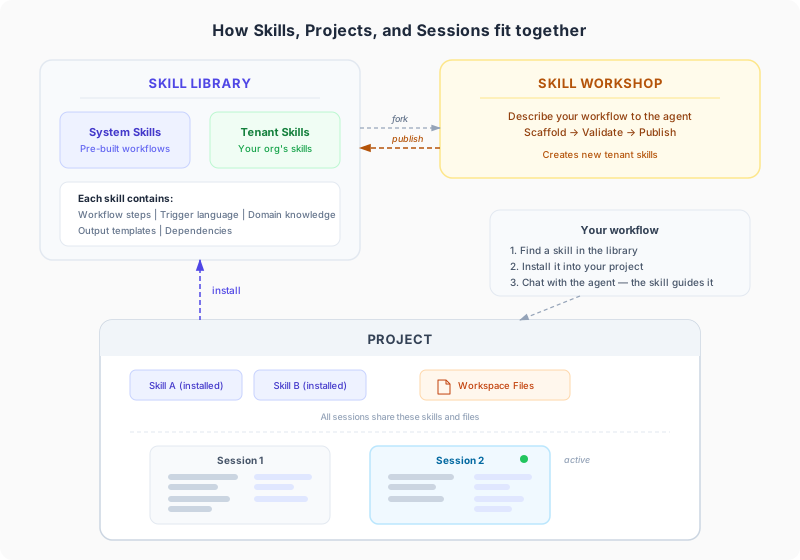
Skills don’t exist in isolation. They fit into Rakenne’s three core concepts:
- A project is your working environment — a dedicated workspace for one piece of work (a contract, a submission, a risk file). See Understanding Projects for details.
- A skill is a reusable workflow. Skills live in the Skill Library and become active when you install them into a project.
- A session is one conversation with the agent inside a project. Skills guide the agent during sessions.
The relationship: you install skills into a project, then use them across sessions.
A single project can have multiple skills installed. For example, an ISO 27001 project might have skills for scope definition, asset inventory, risk assessment, and the Statement of Applicability — each handling a different part of the engagement.
The Skill Library
The Skill Library is where skills are discovered, browsed, and installed. Think of it as an app store for workflows.
It contains three categories:
- System skills — pre-built skills that ship with Rakenne, covering common domains like compliance, legal, clinical, and financial documentation.
- Tenant skills — skills created and shared by people in your organization.
- Your own skills — skills you authored or forked from existing ones.
You browse the library, find skills relevant to your work, and install them into your projects. For the full walkthrough — searching, installing, updating, and managing skills across projects — see From Library to Live Projects: How to Work with Skills in Rakenne .
Creating your own skills
When no existing skill matches your workflow, you can create one. Rakenne provides the Skill Workshop, a dedicated project type where you describe your workflow to the agent and it builds the skill for you — no code required.
The process works like this:
- Describe what the workflow does, when it triggers, and what it produces.
- The agent asks clarifying questions to understand the steps, domain knowledge, and output format.
- It scaffolds the skill — creating the workflow file, reference documents, and metadata.
- You validate and refine until it matches your expectations.
- You publish it to your organization’s library so others can install it.
For the full step-by-step guide, see Creating Skills with the Skill Workshop .
Forking: customizing existing skills
Sometimes a standard skill gets you 80% of the way, but your organization has its own terminology, extra approval steps, or a different checklist. Instead of starting from scratch, you can fork an existing skill — creating your own copy that you can modify and publish.
Forking is how you turn generic best practices into your house methodology. For details on when to fork vs. configure, see the forking section in the skill lifecycle guide.
Example: what using a skill looks like
Here is a typical skill-driven interaction in a project with the “SOC 2 Readiness Assessment” skill installed:
You: I need to run a SOC 2 readiness assessment for our Series B startup client.
Agent: I’ll use the SOC 2 Readiness Assessment skill. Let me start by gathering some context. What Trust Services Criteria are in scope — Security only, or also Availability, Confidentiality, Processing Integrity, or Privacy?
You: Security and Availability.
Agent: Got it. I’ll walk through each criterion. Let’s start with CC1 — Control Environment. Does the organization have a formal information security policy?
(The conversation continues through each criterion, producing a structured readiness report.)
The agent drives the conversation with domain expertise. You provide the facts; the skill provides the structure.
Key takeaways
- A skill is a reusable, domain-specific workflow — not a one-off prompt.
- Skills make AI interactions structured, repeatable, and consistent across users and clients.
- You install skills into projects from the Skill Library.
- You can create your own skills in the Skill Workshop or fork existing ones.
- Skills contain workflow steps, trigger language, domain knowledge, and output templates — all in plain language.
What to read next
- Understanding Projects — how projects, skills, and sessions relate to each other.
- From Library to Live Projects — the full lifecycle of discovering, installing, updating, and sharing skills.
- Creating Skills with the Skill Workshop — step-by-step guide to authoring your own skills.